

Understand time buckets
Learn how time buckets help you aggregate data by time interval for efficient and simple real-time analytics
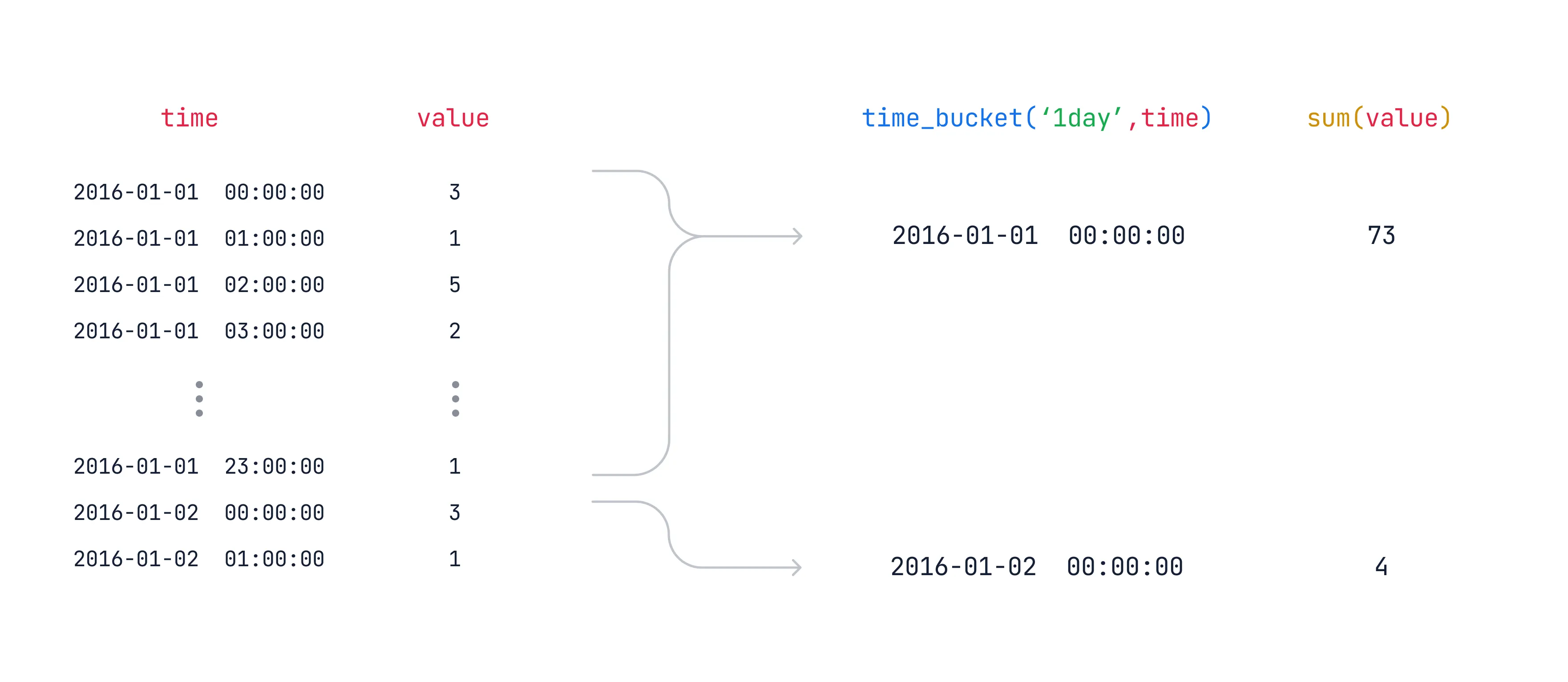
The time_bucket function enables you to aggregate data in a hypertable into buckets of time. For example, 5 minutes, 1 hour, or 3 days.
It’s similar to PostgreSQL‘s date_bin function, but it gives you more
flexibility in the bucket size and start time.
You can use it to roll up data for analysis or downsampling. For example, you can calculate 5-minute averages for a sensor reading over the last day. You can perform these rollups as needed, or pre-calculate them in continuous aggregates.
For examples of the time_bucket function, see
Aggregate time-series data with time_bucket.
How time bucketing works
Section titled “How time bucketing works”Time bucketing groups data into time intervals. With time_bucket, the interval
length can be any number of microseconds, milliseconds, seconds, minutes, hours,
days, weeks, months, or years.
The time_bucket function is usually used in combination with GROUP BY to
aggregate data. For example, you can calculate the average, maximum, minimum, or
sum of values within a bucket.
Origin
Section titled “Origin”The origin determines when time buckets start and end. By default, a time bucket
doesn’t start at the earliest timestamp in your data. There is often a more
logical time. For example, you might collect your first data point at 00:37,
but you probably want your daily buckets to start at midnight. Similarly, you
might collect your first data point on a Wednesday, but you might want your
weekly buckets calculated from Sunday or Monday.
Instead, time is divided into buckets based on intervals from the origin. The
following diagram shows how, using the example of 2-week buckets. The first
possible start date for a bucket is origin. The next possible start date for a
bucket is origin + bucket interval. If your first timestamp does not fall
exactly on a possible start date, the immediately preceding start date is used
for the beginning of the bucket.
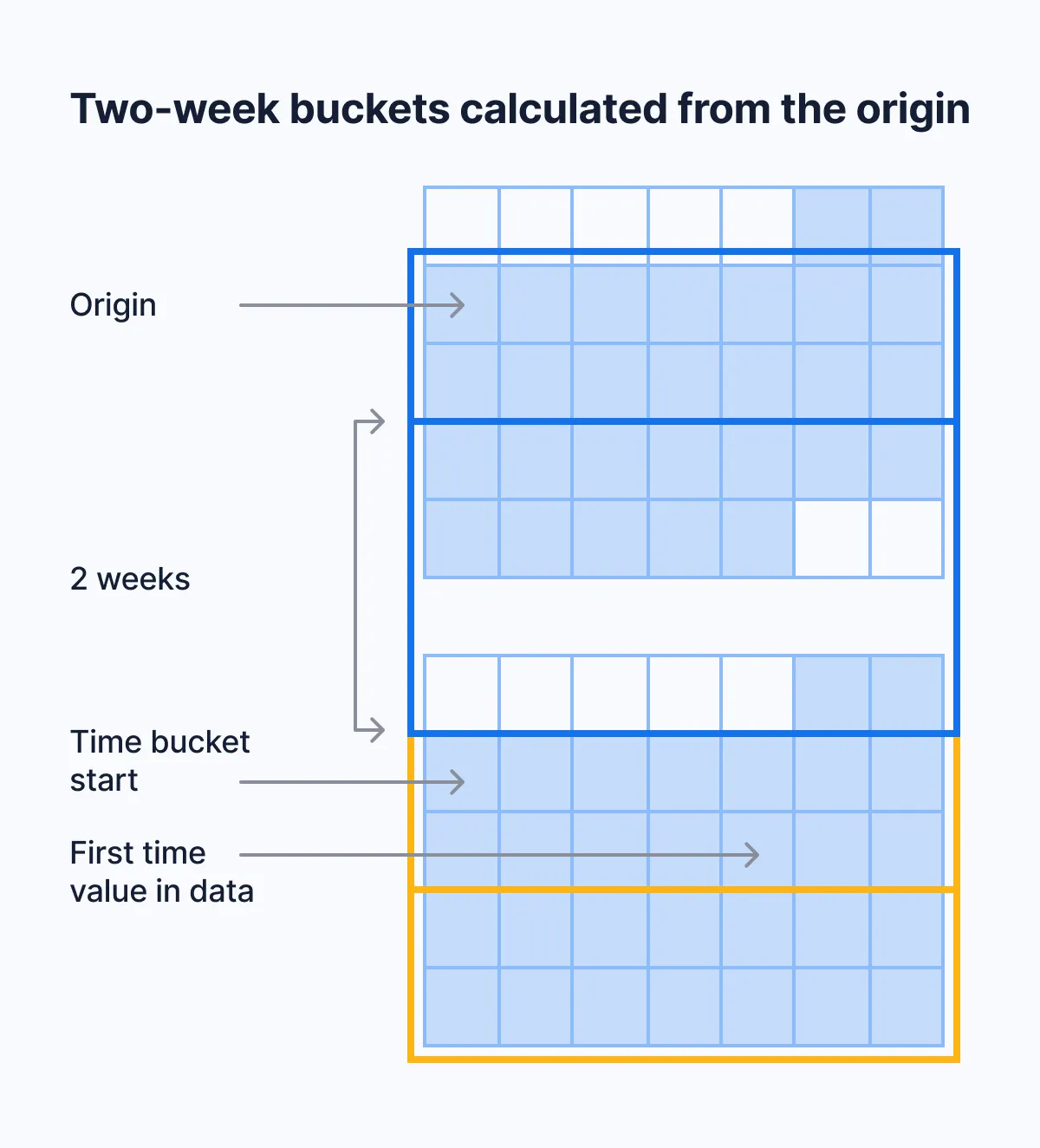
For example, say that your data’s earliest timestamp is April 24, 2020. If you bucket by an interval of two weeks, the first bucket doesn’t start on April 24, which is a Friday. It also doesn’t start on April 20, which is the immediately preceding Monday. It starts on April 13, because you can get to April 13, 2020, by counting in two-week increments from January 3, 2000, which is the default origin in this case.
Default origins
Section titled “Default origins”For intervals that don’t include months or years, the default origin is January 3, 2000. For month or year intervals, the default origin is January 1, 2000. For integer time values, the default origin is 0.
These choices make the time ranges of time buckets more intuitive. Because January 3, 2000, is a Monday, weekly time buckets start on Monday. This is compliant with the ISO standard for calculating calendar weeks. Monthly and yearly time buckets use January 1, 2000, as an origin. This allows them to start on the first day of the calendar month or year.
If you prefer another origin, you can set it yourself using the origin
parameter. For example, to start weeks on Sunday, set the origin to
Sunday, January 2, 2000.
Timezones
Section titled “Timezones”The origin time depends on the data type of your time values.
If you use TIMESTAMP, by default, bucket start times are aligned with
00:00:00. Daily and weekly buckets start at 00:00:00. Shorter buckets start
at a time that you can get to by counting in bucket increments from 00:00:00
on the origin date.
If you use TIMESTAMPTZ, by default, bucket start times are aligned with
00:00:00 UTC. To align time buckets to another timezone, set the timezone
parameter.
Learn more
Section titled “Learn more”- Use time buckets: SQL examples for grouping, offsetting, and calculating time buckets.
- Create a continuous aggregate: Pre-compute time bucket aggregations with continuous aggregates.
time_bucket()reference: Full API reference with all parameters.- Gapfilling and interpolation:
Fill gaps in time bucket results with
time_bucket_gapfill().