

Set up hypercore
Reduce chunk size by up to 98% and speed up queries by converting data between the rowstore and columnstore
Hypercore is the hybrid row-columnar storage engine in TimescaleDB used by hypertables. Traditional databases force a trade-off between fast inserts (row-based storage) and efficient analytics (columnar storage). Hypercore eliminates this trade-off, allowing real-time analytics without sacrificing transactional capabilities.
Hypercore dynamically stores data in the most efficient format for its lifecycle:
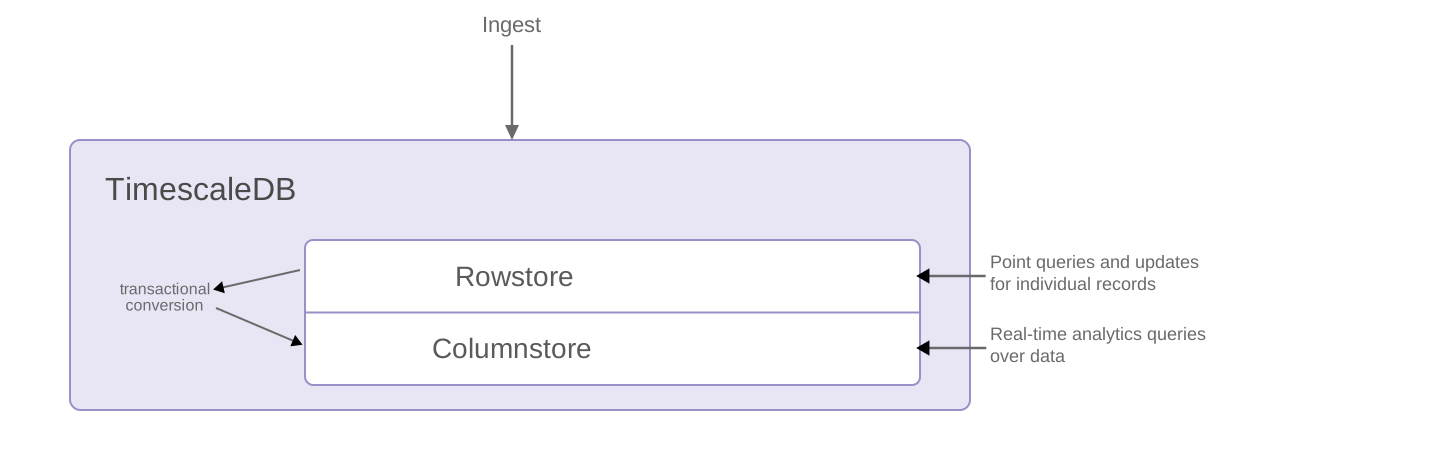
- Row-based storage for recent data: the most recent chunk (and possibly more) is always stored in the rowstore, ensuring fast inserts, updates, and low-latency single record queries. Additionally, row-based storage is used as a writethrough for inserts and updates to columnar storage.
- Columnar storage for analytical performance: chunks are automatically compressed into the columnstore, optimizing storage efficiency and accelerating analytical queries.
Unlike traditional columnar databases, hypercore allows data to be inserted or modified at any stage, making it a flexible solution for both high-ingest transactional workloads and real-time analytics, within a single database.
When you convert chunks from the rowstore to the columnstore, multiple records are grouped into a single row. The columns of this row hold an array-like structure that stores all the data. For example, data in the following rowstore chunk:
| Timestamp | Device ID | Device Type | CPU | Disk IO |
|---|---|---|---|---|
| 12:00:01 | A | SSD | 70.11 | 13.4 |
| 12:00:01 | B | HDD | 69.70 | 20.5 |
| 12:00:02 | A | SSD | 70.12 | 13.2 |
| 12:00:02 | B | HDD | 69.69 | 23.4 |
| 12:00:03 | A | SSD | 70.14 | 13.0 |
| 12:00:03 | B | HDD | 69.70 | 25.2 |
Is converted and compressed into arrays in a row in the columnstore:
| Timestamp | Device ID | Device Type | CPU | Disk IO |
|---|---|---|---|---|
| [12:00:01, 12:00:01, 12:00:02, 12:00:02, 12:00:03, 12:00:03] | [A, B, A, B, A, B] | [SSD, HDD, SSD, HDD, SSD, HDD] | [70.11, 69.70, 70.12, 69.69, 70.14, 69.70] | [13.4, 20.5, 13.2, 23.4, 13.0, 25.2] |
Because a single row takes up less disk space, you can reduce your chunk size by up to 98%, and can also speed up your queries. This saves on storage costs, and keeps your queries operating at lightning speed.
For an in-depth explanation of how hypertables and hypercore work, see the Data model.
This page shows you how to get the best results when you set a policy to automatically convert chunks in a hypertable from the rowstore to the columnstore.
Prerequisites
Section titled “Prerequisites”To follow the steps on this page:
-
Create a target Tiger Cloud service with real-time analytics enabled.
You need your connection details.
The code samples in this page use the crypto_sample.zip data from this key features tutorial.
Optimize your data with columnstore policies
Section titled “Optimize your data with columnstore policies”The compression ratio and query performance of data in the columnstore is dependent on the order and structure of your
data. Rows that change over a dimension should be close to each other. With time-series data, you orderby the time
dimension. For example, Timestamp:
| Timestamp | Device ID | Device Type | CPU | Disk IO |
|---|---|---|---|---|
| 12:00:01 | A | SSD | 70.11 | 13.4 |
This ensures that records are compressed and accessed in the same order. However, you would always have to access the data using the time dimension, then filter all the rows using other criteria. To make your queries more efficient, you segment your data based on the following:
- The way you want to access it. For example, to rapidly access data about a
single device, you
segmentbytheDevice IDcolumn. This enables you to run much faster analytical queries on data in the columnstore. - The compression rate you want to achieve. The lower the cardinality of the
segmentbycolumn, the better compression results you get.
When TimescaleDB converts a chunk to the columnstore, it automatically creates a different schema for your
data. It also creates and uses custom indexes to incorporate the segmentby and orderby parameters when
you write to and read from the columnstore.
To set up your hypercore automation:
- Connect to your Tiger Cloud service
In Tiger Console open an SQL editor. You can also connect to your service using psql.
- Enable columnstore on a hypertable
For efficient queries, remember to
segmentbythe column you will use most often to filter your data. For example:-
Hypertables:
Use
CREATE TABLEfor a hypertableCREATE TABLE crypto_ticks ("time" TIMESTAMPTZ,symbol TEXT,price DOUBLE PRECISION,day_volume NUMERIC) WITH (timescaledb.hypertable,timescaledb.segmentby='symbol',timescaledb.orderby='time DESC');When you create a hypertable using CREATE TABLE … WITH …, the default partitioning column is automatically the first column with a timestamp data type. Also, TimescaleDB creates a columnstore policy that automatically converts your data to the columnstore, after an interval equal to the value of the chunk_interval, defined through
afterin the policy. This columnar format enables fast scanning and aggregation, optimizing performance for analytical workloads while also saving significant storage space. In the columnstore conversion, hypertable chunks are compressed by up to 98%, and organized for efficient, large-scale queries.You can customize this policy later using alter_job. However, to change
afterorcreated_before, the compression settings, or the hypertable the policy is acting on, you must remove the columnstore policy and add a new one.You can also manually convert chunks in a hypertable to the columnstore.
-
Continuous aggregates:
Use
ALTER MATERIALIZED VIEWfor a continuous aggregate:ALTER MATERIALIZED VIEW assets_candlestick_daily set (timescaledb.enable_columnstore = true,timescaledb.segmentby = 'symbol');Before you say
huh, a continuous aggregate is a specialized hypertable.Add a policy to convert chunks to the columnstore at a specific time interval. Create a columnstore_policy that automatically converts chunks in a hypertable to the columnstore. For example:
CALL add_columnstore_policy('assets_candlestick_daily', after => INTERVAL '1d');
TimescaleDB is optimized for fast updates on compressed data in the columnstore. To modify data in the columnstore, use standard SQL.
-
- Check the columnstore policy
View your data space saving. When you convert data to the columnstore, as well as being optimized for analytics, it is compressed by more than 90%. This helps you save on storage costs and keeps your queries operating at lightning speed. To see the amount of space saved:
SELECTpg_size_pretty(before_compression_total_bytes) as before,pg_size_pretty(after_compression_total_bytes) as afterFROM hypertable_columnstore_stats('crypto_ticks');You see something like:
before after 194 MB 24 MB View the policies that you set or that already exist:
SELECT * FROM timescaledb_information.jobsWHERE proc_name='policy_compression'; - Pause a columnstore policySELECT * FROM timescaledb_information.jobs whereproc_name = 'policy_compression' AND relname = 'crypto_ticks'-- Select the JOB_ID from the resultsSELECT alter_job(JOB_ID, scheduled => false);
See alter_job.
- Restart a columnstore policySELECT alter_job(JOB_ID, scheduled => true);
See alter_job.
- Remove a columnstore policyCALL remove_columnstore_policy('crypto_ticks');
- Disable columnstore
If your table has chunks in the columnstore, you have to convert the chunks back to the rowstore before you disable the columnstore.
ALTER TABLE crypto_ticks SET (timescaledb.enable_columnstore = false);
Reference
Section titled “Reference”For integers, timestamps, and other integer-like types, data is compressed using delta encoding, delta-of-delta, simple-8b, and run-length encoding. For columns with few repeated values, XOR-based and dictionary compression is used. For all other types, dictionary compression is used.