

Improve hypertable and query performance
Use chunk skipping to optimize hypertable performance and make sure your analytical queries are as fast as they can be
Hypertables are PostgreSQL tables that help you improve insert and query performance by automatically partitioning your data by time. Each hypertable is made up of child tables called chunks. Each chunk is assigned a range of time, and only contains data from that range. When you run a query, TimescaleDB identifies the correct chunk and runs the query on it, instead of going through the entire table. This page shows you how to tune hypertables to increase performance even more.
- Optimize hypertable chunk intervals: choose the optimum chunk size for your data - manually or automatically
- Enable chunk skipping: skip chunks on non-partitioning columns in hypertables when you query your data
- Analyze your hypertables: use PostgreSQL
ANALYZEto create the best query plan
Optimize hypertable chunk intervals
Section titled “Optimize hypertable chunk intervals”Tuning your hypertable chunk interval can improve performance in your database, especially as your workload evolves over time. With TimescaleDB, you can do this manually or automatically.
Manual tuning
Section titled “Manual tuning”To manually adjust the chunk size in your database, take the following steps:
- Choose an optimum chunk interval
PostgreSQL builds the index on the fly during ingestion. That means that to build a new entry on the index, a significant portion of the index needs to be traversed during every row insertion. When the index does not fit into memory, it is constantly flushed to disk and read back. This wastes IO resources which would otherwise be used for writing the heap/WAL data to disk.
The default chunk interval is 7 days. However, best practice is to set
chunk_intervalso that prior to processing, the indexes for chunks currently being ingested into fit within 25% of main memory. For example, on a system with 64 GB of memory, if index growth is approximately 2 GB per day, a 1-week chunk interval is appropriate. If index growth is around 10 GB per day, use a 1-day interval.You set
chunk_intervalwhen you create a hypertable, or by callingset_chunk_time_intervalon an existing hypertable.In the following example you create a table called
conditionsthat stores time values in thetimecolumn and has chunks that store data for achunk_intervalof one day:CREATE TABLE conditions (time TIMESTAMPTZ NOT NULL,location TEXT NOT NULL,device TEXT NOT NULL,temperature DOUBLE PRECISION NULL,humidity DOUBLE PRECISION NULL) WITH (tsdb.hypertable,tsdb.chunk_interval='1 day'); - Check current setting for chunk intervals
Query the TimescaleDB catalog for a hypertable. For example:
SELECT *FROM timescaledb_information.dimensionsWHERE hypertable_name = 'conditions';The result looks like:
hypertable_schema | hypertable_name | dimension_number | column_name | column_type | dimension_type | time_interval | integer_interval | integer_now_func | num_partitions-------------------+-----------------+------------------+-------------+--------------------------+----------------+---------------+------------------+------------------+----------------public | metrics | 1 | recorded | timestamp with time zone | Time | 1 day | | |Time-based interval lengths are reported in microseconds.
- Change the chunk interval length on an existing hypertable
To change the chunk interval on an already existing hypertable, call
set_chunk_time_interval().SELECT set_chunk_time_interval('conditions', INTERVAL '24 hours');The updated chunk interval only applies to new chunks. This means setting an overly long interval might take a long time to correct. For example, if you set
chunk_intervalto 1 year and start inserting data, you can no longer shorten the chunk for that year. If you need to correct this situation, create a new hypertable and migrate your data.While chunk turnover does not degrade performance, chunk creation does take longer lock time than a normal
INSERToperation into a chunk that has already been created. This means that if multiple chunks are being created at the same time, the transactions block each other until the first transaction is completed.
If you use expensive index types, such as some PostGIS geospatial indexes, take
care to check the total size of the chunk and its index using
chunks_detailed_size().
Automated tuning
Section titled “Automated tuning”Automated chunk tuning manages chunk intervals for you. Tiger Cloud continuously evaluates your hypertable and adjusts the interval when it detects the current setting is no longer optimal. Updated chunk intervals apply to new chunks only; existing historical chunks are not affected.
Automated chunk tuning is currently in beta.
When you enable automated chunk tuning on a hypertable, the interval is evaluated and updated within 5 minutes if necessary. The interval is changed incrementally rather than jumping directly to the target interval:
- Large increase: if the recommended interval is more than double the current one, the interval is only doubled each evaluation cycle rather than jumping directly to the target. For example, if the current interval is 1 day and the recommended interval is 8 days, the interval increases to 2 days first, then 4 days, then 8 days over successive evaluations.
- Large decrease: if the recommended interval is less than half the current one, the interval is only halved each evaluation cycle rather than jumping directly to the target. For example, if the current interval is 8 days and the recommended interval is 1 day, the interval decreases to 4 days first, then 2 days, then 1 day over successive evaluations.
- Small change: if the recommended interval is within 2x of the current one, bigger or smaller, the new interval is applied directly. For example, if the current interval is 4 days and the recommended interval is 6 days, the interval changes to 6 days immediately.
If a columnstore policy is configured on the hypertable, automated chunk tuning respects it. The chunk interval is never increased beyond the after value. For example, if your compression policy compresses data older than 1 day, the maximum chunk interval is 1 day.
You can track all interval changes in the Activity tab.
Automated tuning is off by default and is configured at the individual hypertable level. Even when disabled, Tiger Console shows the recommended chunk interval for every hypertable so you can evaluate whether a change is warranted before opting in.
Manage chunk tuning
Section titled “Manage chunk tuning”To enable automated chunk tuning:
- In Tiger Console, select your service
- Click Explorer and select your hypertable
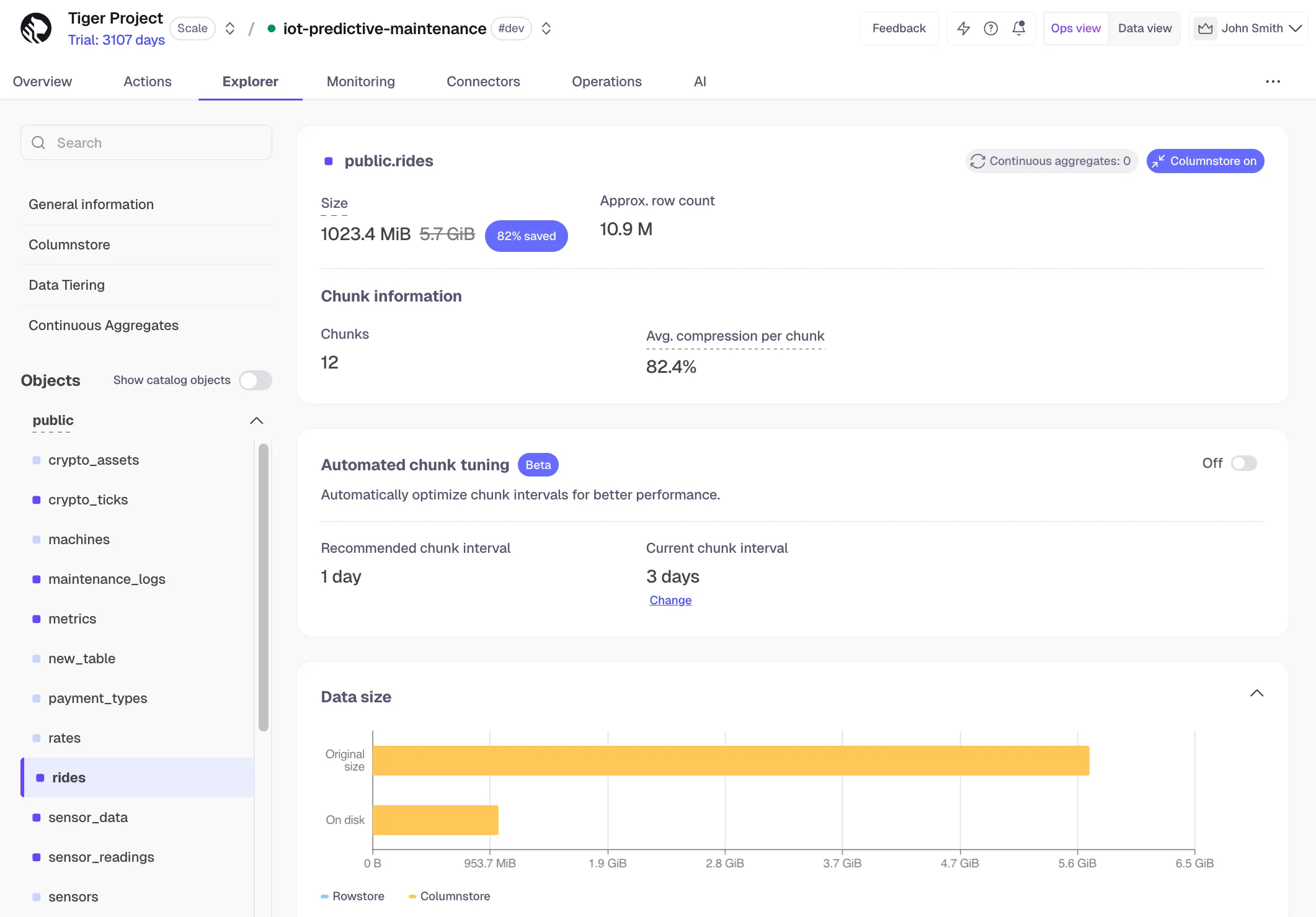
- Toggle on Automated chunk tuning
- For a #prod-tagged service, click Request beta access
Our team will manually review your hypertable and the recommended intervals before enabling.
The recommended chunk interval is visible regardless of whether automated tuning is enabled, so you can preview the suggested value before turning it on.
To disable automated chunk tuning:
- In Tiger Console, select your service
- Click Explorer and select your hypertable
- Toggle off Automated chunk tuning
- Optionally set your preferred interval by clicking Change under the interval size
The next new chunk will use the interval you specify.
Limitations
Section titled “Limitations”Automated chunk tuning is not supported for:
- Hypertables not owned by
tsdbadmin. - Hypertables that do not use a time-based partition column.
Enable chunk skipping
Section titled “Enable chunk skipping”One of the key purposes of hypertables is to make your analytical queries run with the lowest latency possible.
When you execute a query on a hypertable, you do not parse the whole table; you only access the chunks necessary
to satisfy the query. This works well when the WHERE clause of a query uses the column by which a hypertable is
partitioned. For example, in a hypertable where every day of the year is a separate chunk, a query for September 1
accesses only the chunk for that day.
However, many queries use columns other than the partitioning one. For example, a satellite company might have a table with two columns: one for when data was gathered by a satellite and one for when it was added to the database. If you partition by the date of gathering, a query by the date of adding accesses all chunks in the hypertable and slows the performance.
To improve query performance, TimescaleDB enables you to skip chunks on non-partitioning columns in hypertables.
Chunk skipping only works on chunks converted to the columnstore after you enable_chunk_skipping.
How chunk skipping works
Section titled “How chunk skipping works”You enable chunk skipping on a column in a hypertable. TimescaleDB tracks the minimum and maximum values for that
column in each chunk. These ranges are stored in the start (inclusive) and end (exclusive) format in the chunk_column_stats
catalog table. TimescaleDB uses these ranges for dynamic chunk exclusion when the WHERE clause of an SQL query
specifies ranges on the column.
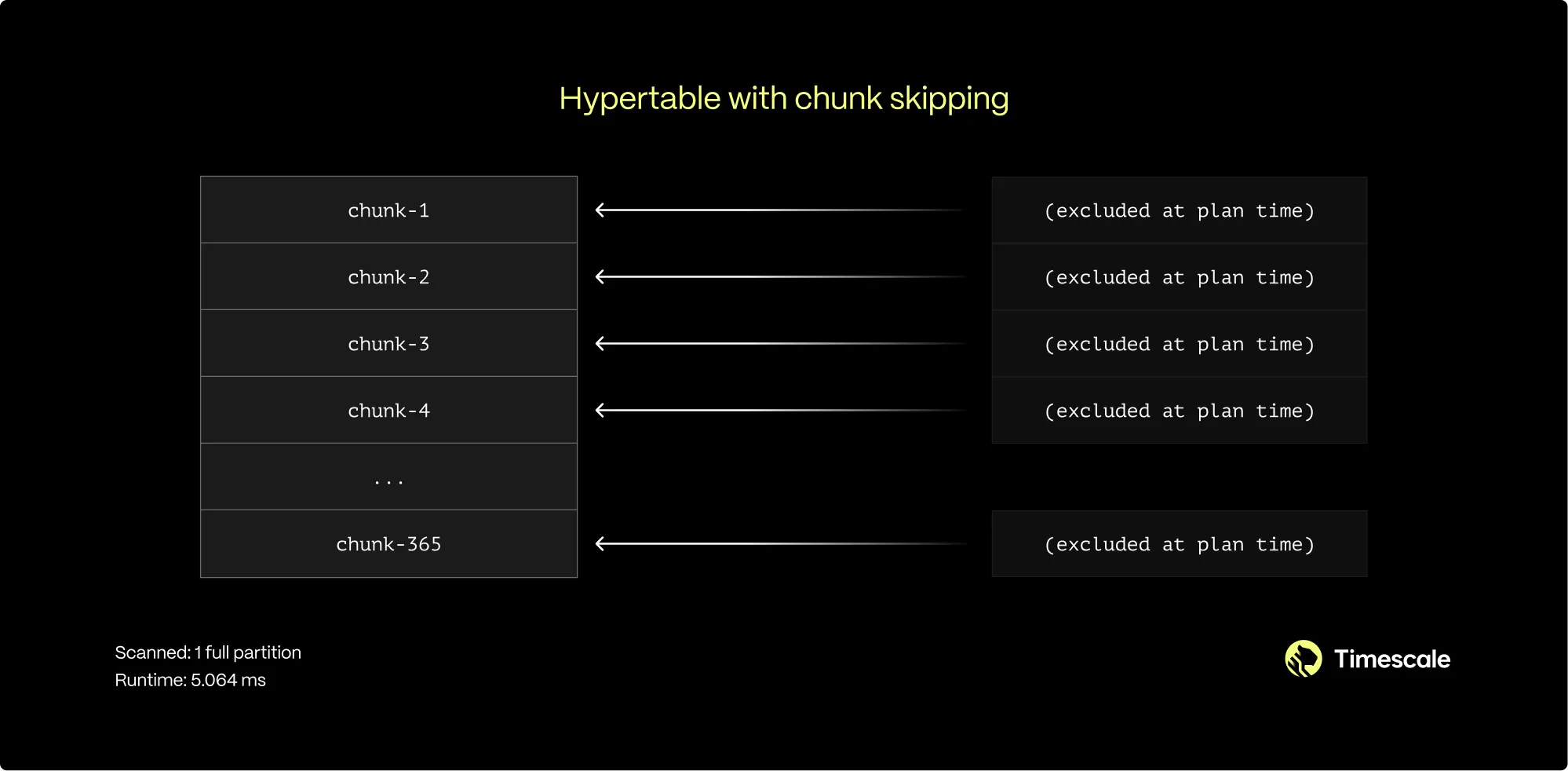
You can enable chunk skipping on hypertables compressed into the columnstore for smallint, int, bigint, serial,
bigserial, date, timestamp, or timestamptz type columns.
When to enable chunk skipping
Section titled “When to enable chunk skipping”You can enable chunk skipping on as many columns as you need. However, best practice is to enable it on columns that are both:
- Correlated, that is, related to the partitioning column in some way.
- Referenced in the
WHEREclauses of the queries.
In the satellite example, the time of adding data to a database inevitably follows the time of gathering. Sequential IDs and the creation timestamp for both entities also increase synchronously. This means those two columns are correlated.
For a more in-depth look on chunk skipping, see our blog post.
Enable chunk skipping
Section titled “Enable chunk skipping”To enable chunk skipping on a column, call enable_chunk_skipping()
on a hypertable for a column_name. For example, the following query enables chunk skipping on the order_id column
in the orders table:
SELECT enable_chunk_skipping('orders', 'order_id');For more details on how to implement chunk skipping, see the API reference.
Analyze your hypertables
Section titled “Analyze your hypertables”You can use the PostgreSQL ANALYZE command to query all chunks in your
hypertable. The statistics collected by the ANALYZE command are used by the
PostgreSQL planner to create the best query plan. For more information about the
ANALYZE command, see the PostgreSQL documentation.