

Back up and recover services
Protect your data with automatic backups
Tiger Cloud provides comprehensive backup and recovery solutions to protect your data, including automatic daily backups and point-in-time recovery.
Automatic backups
Section titled “Automatic backups”Tiger Cloud automatically handles backup for your Tiger Cloud services using the pgBackRest tool. You don’t need to perform
backups manually.
Tiger Cloud automatically creates one full backup every week, and incremental backups every day in the same region as your service. Additionally, all Write-Ahead Log (WAL) files are retained back to the oldest full backup. This means that you always have a full backup available for the current and previous week:
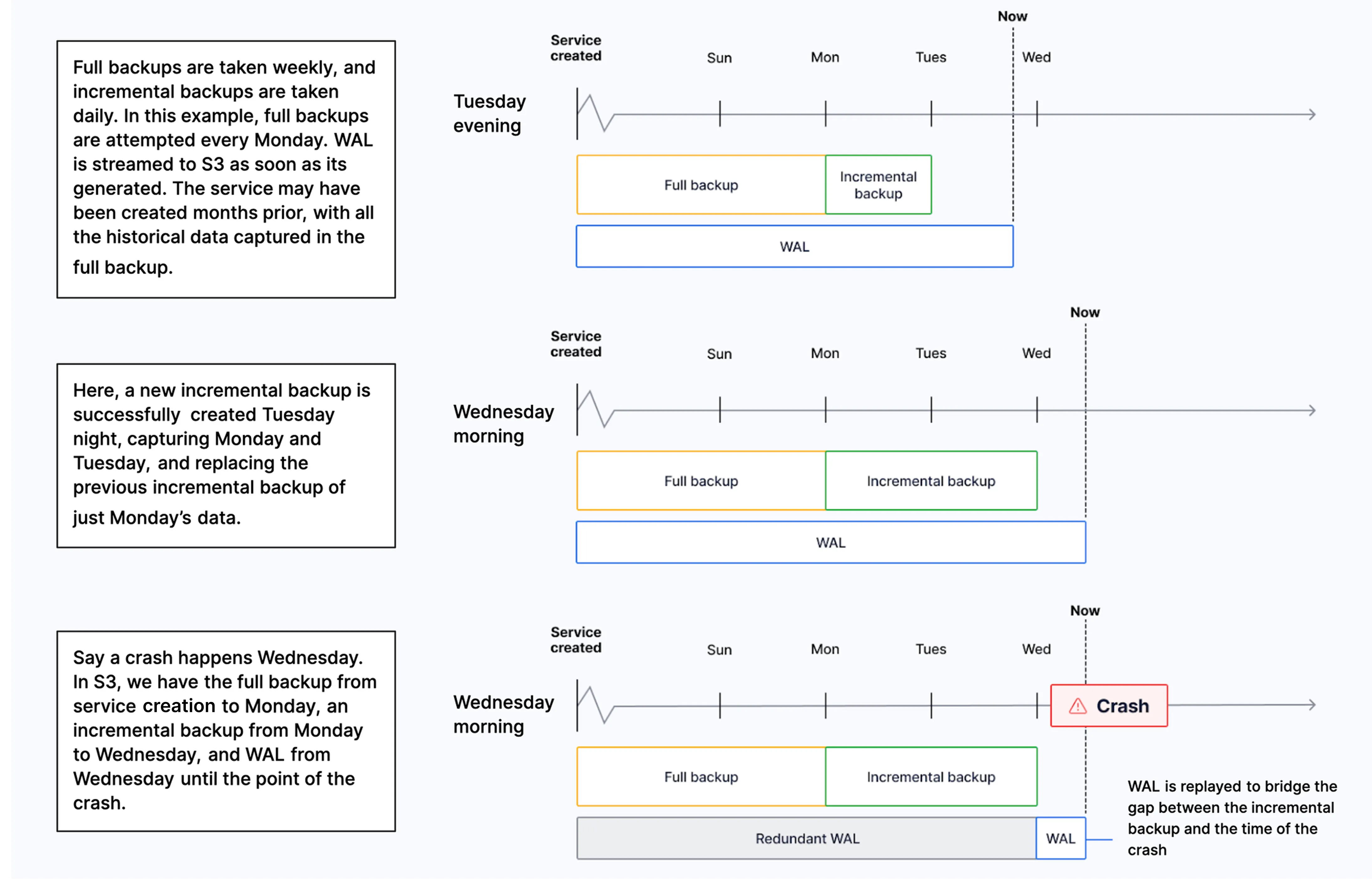
On Scale and Performance pricing plans, you can check the list of backups for the previous 14 days in Tiger Console. To do so, select your service, then click Operations > Backup and restore > Backup history.
In the event of a storage failure, a service automatically recovers from a backup to the point of failure. If the whole availability zone goes down, your Tiger Cloud services are recovered in a different zone. In the event of a user error, you can create a point-in-time recovery fork.